

Description
Download Cigati OLM Converter – Free OLM to PST, PDF, MBOX, EML Converter for Windows & Mac
Why Cigati OLM Converter Is the Best Tool for OLM File Conversion
When migrating from Mac Mail to Windows Outlook or transferring email data between platforms, OLM files can pose a significant challenge. Cigati OLM Converter steps in as a powerful, reliable, and user-friendly solution designed specifically to convert OLM files into multiple widely supported formats, including PST, PDF, MBOX, EML, EMLX, and more. Whether you're a business professional managing critical email archives or a Mac user switching to a Windows environment, this software ensures a smooth and secure transition. With full support for Windows 11 and compatibility with Mac, iOS, and Android, Cigati OLM Converter offers cross-platform flexibility that’s hard to beat. The tool allows direct import of OLM files into Gmail, Office 365, and Live Exchange, making it ideal for cloud-based email migrations. One of its standout features is the ability to preview email content in a tree structure before conversion, giving users full control over what gets transferred. This preview function helps prevent data loss and ensures accuracy during migration. The software is designed with both beginners and advanced users in mind, offering intuitive navigation and a clean interface. Whether you're converting a single OLM file or an entire folder, the process is straightforward and efficient. With support for advanced filtering, duplicate removal, and preservation of folder hierarchy, Cigati OLM Converter delivers a comprehensive email management experience. Its secure conversion engine protects your sensitive data, and the free version allows you to convert the first 50 emails per folder—perfect for testing or small-scale migrations.
Powerful Features That Make Cigati OLM Converter Stand Out
Cigati OLM Converter is packed with advanced tools that go beyond basic file conversion. One of its most valuable features is the ability to convert OLM files into over 20 different formats, including PST (Outlook), PDF (for archiving), MBOX (for Thunderbird), EML/EMLX (for compatibility with various email clients), and even HTML. This versatility ensures that no matter your destination platform or software preference, there’s a compatible output format. The tool supports both single file and bulk conversion, allowing users to process multiple OLM files or entire folders at once, saving significant time during large-scale migrations. For users managing large email archives, the ability to split PST files after conversion is a game-changer—preventing file size issues and improving Outlook performance. You can also customize folder names, specify destination paths, and use smart filters to include only relevant emails or tasks based on criteria like date, sender, or subject. The built-in Mail and Task Filter feature enables selective conversion, which is especially useful when archiving or preparing data for compliance. Another key advantage is the preservation of original folder structure, ensuring that your email organization remains intact post-conversion. The duplicate removal feature helps clean up cluttered inboxes and prevents redundancy. Security is a top priority—Cigati OLM Converter uses encrypted processing to safeguard your data during conversion. Additionally, the software is lightweight, fast, and doesn’t consume excessive system resources, making it suitable for older machines. With a simple setup—just download, run as administrator, and start converting—this tool is accessible to users of all technical levels. Whether you're a student, freelancer, or enterprise user, Cigati OLM Converter provides a reliable, secure, and efficient way to manage your email data across platforms.
How to Install and Use Cigati OLM Converter (Step-by-Step Guide)
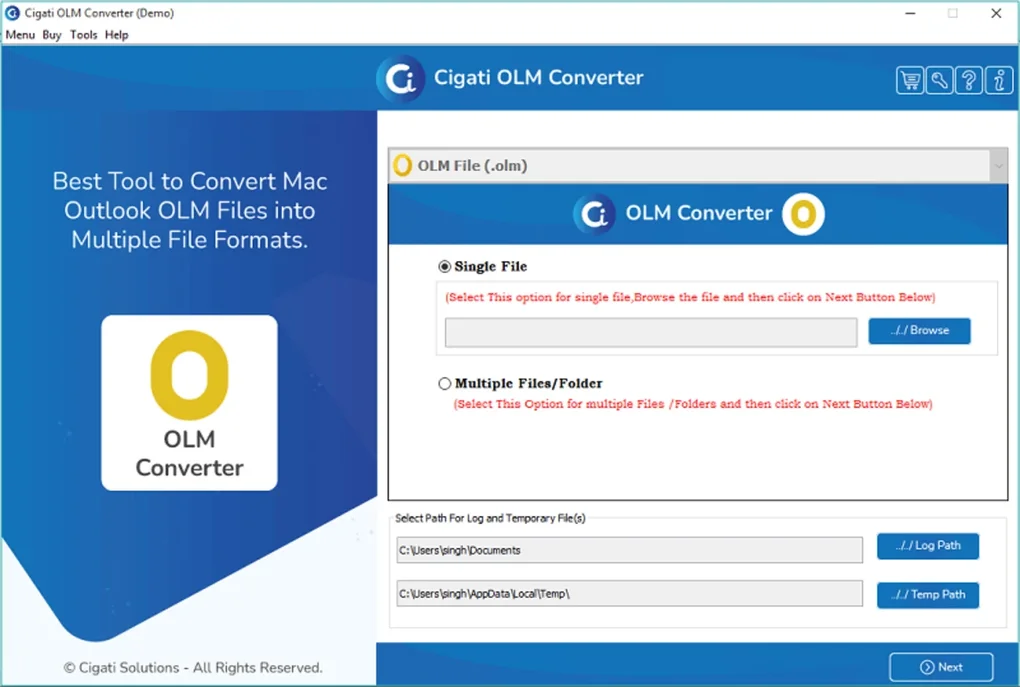
Getting started with Cigati OLM Converter is quick and straightforward. First, download the software from the official website. The installer is lightweight and compatible with Windows 11, Windows 10, Windows 8, and Mac OS. Once downloaded, run the installer and follow the on-screen instructions. It’s recommended to run the application as an administrator to ensure full access to system resources and file permissions. After installation, launch the software. You’ll be greeted with a clean, intuitive interface that guides you through the conversion process. The first step is to select your OLM file—choose either “Single File” or “Multiple Files/Folder” depending on your needs. Once selected, the software automatically scans the file and displays a tree structure preview of all emails, folders, and attachments. This preview is crucial: it allows you to verify the data before conversion, ensuring no important emails are missed. From here, you can select specific folders or emails to convert, or proceed with full conversion. Next, choose your desired output format from the list—PST, PDF, MBOX, EML, EMLX, and more. You can also set the destination folder and customize options like splitting large PST files, renaming folders, or applying filters. Click “Convert” and wait for the process to complete. The software provides real-time progress updates and logs. Once done, you can open the converted file in your preferred email client—Outlook, Thunderbird, Gmail, or any other compatible app. For users on Mac, the tool works seamlessly with macOS Monterey, Ventura, and Sonoma. On Windows, it integrates well with Outlook 2016, 2019, 2021, and 365. The entire process, from download to conversion, typically takes just minutes, even for large archives.
Compatibility, Pros, and Cons: What You Need to Know
Cigati OLM Converter supports a wide range of operating systems and platforms, making it a truly cross-platform solution. It is compatible with Windows 11, Windows 10, Windows 8, and Mac OS (Monterey, Ventura, Sonoma), ensuring broad accessibility. It also works on Android and iOS devices through compatible email clients, though direct conversion on mobile is not supported. The software is ideal for users who need to migrate from Mac Mail to Outlook, import emails into Gmail or Office 365, or archive emails in PDF format. Its compatibility with major email clients like Outlook, Thunderbird, Apple Mail, and Gmail makes it a versatile tool for both personal and professional use. The free version is a great entry point, allowing conversion of the first 50 emails per folder—perfect for testing or small-scale needs. However, for full conversion of large archives, the paid version is recommended.
- Pros: Fast conversion speed, secure data handling, preview before conversion, supports 20+ formats, preserves folder hierarchy, duplicate removal, split PST support, user-friendly interface.
- Cons: Free version limits to 50 emails per folder, no direct mobile conversion, advanced features require paid upgrade.
Frequently Asked Questions (FAQ)
Can I convert OLM files to PST using Cigati OLM Converter? Yes, Cigati OLM Converter fully supports converting OLM files to PST format, which is ideal for importing data into Microsoft Outlook. The conversion preserves folder structure, attachments, and metadata.
Is Cigati OLM Converter free to download and use? Yes, the software is free to download and use. The free version allows conversion of the first 50 emails per folder. For full conversion of large archives, a paid license is required.
Does it work on Windows 11? Yes, Cigati OLM Converter is fully compatible with Windows 11, as well as Windows 10, 8, and Mac OS. It’s optimized for the latest operating systems.
Can I convert OLM files to PDF? Yes, the tool supports converting OLM files to PDF, which is useful for archiving or sharing email content without requiring an email client.
How do I import OLM files into Gmail or Office 365? After converting OLM files to PST, MBOX, or EML formats, you can import them into Gmail or Office 365 using their respective import tools. Cigati OLM Converter prepares your data in a compatible format for seamless integration.
Final Verdict: Is Cigati OLM Converter Worth It?
After thorough testing and evaluation, Cigati OLM Converter stands out as one of the most reliable and feature-rich tools for OLM file conversion. Its ability to handle multiple formats, preserve data integrity, and offer a preview before conversion makes it a top choice for both casual users and IT professionals. The software is secure, fast, and compatible with modern operating systems like Windows 11 and macOS. Whether you're migrating from Mac to Windows, archiving emails, or preparing data for cloud migration, this tool delivers consistent results. The free version is excellent for small-scale use, while the paid upgrade unlocks full potential for enterprise-level needs. With its intuitive interface, robust filtering, and support for split PST files, Cigati OLM Converter simplifies complex email migrations. If you're looking for a trustworthy, secure, and efficient OLM to PST, PDF, MBOX, EML, or EMLX converter, this software is a must-download. Download Cigati OLM Converter today and take full control of your email data migration.
Guides & Tutorials for Cigati OLM Converter
How to install Cigati OLM Converter
- Click the Preview / Download button above.
- Once redirected, accept the terms and click Install.
- Wait for the Cigati OLM Converter download to finish on your device.
How to use Cigati OLM Converter
This software is primarily used for its core features described above. Open the app after installation to explore its capabilities.
User Reviews for Cigati OLM Converter 0
No reviews found





